
This document defines the partner reconciliation settings which establishes the default settings for partner configuration. These settings may be overridden at the tracker level. For more information on Kochava’s Attribution Engine, refer to our Attribution Overview support documentation.
SAN Default Reconciliation Settings:
| Acquisition | Apple Search Ads | |||
| Amazon Ads | ||||
| DoubleClick | ||||
| DV360 & CM360 | ||||
| SnapChat | ||||
| Yahoo! | ||||
| TikTok | ||||
| Venatus | ||||
| Simpli.fi | ||||
| Lyft | ||||
| GumGum | ||||
| Fetch Rewards | ||||
| Uber Ads | ||||
| Tubi SAN | ||||
| TitanOS – SAN | ||||
| Telly – SAN | ||||
| Universal Ads – SAN | ||||
| Xumo – SAN | ||||
| Reengagement | ||||
| Amazon Ads | ||||
| DoubleClick | ||||
| DV360 & CM360 | ||||
| Snapchat | ||||
| Yahoo! | ||||
| TikTok | ||||
| Venatus | ||||
| Simpli.fi | ||||
| Lyft | ||||
| GumGum | ||||
| Fetch Rewards | ||||
| Uber Ads | ||||
| Tubi SAN | ||||
| TitanOS – SAN | ||||
| Telly – SAN | ||||
| Universal Ads – SAN | ||||
| Xumo – SAN |
Partner Reconciliation Settings User Interface
- Log in to Kochava.
- Select the desired Account and App.
- Select App Configurations > Partner Configuration.
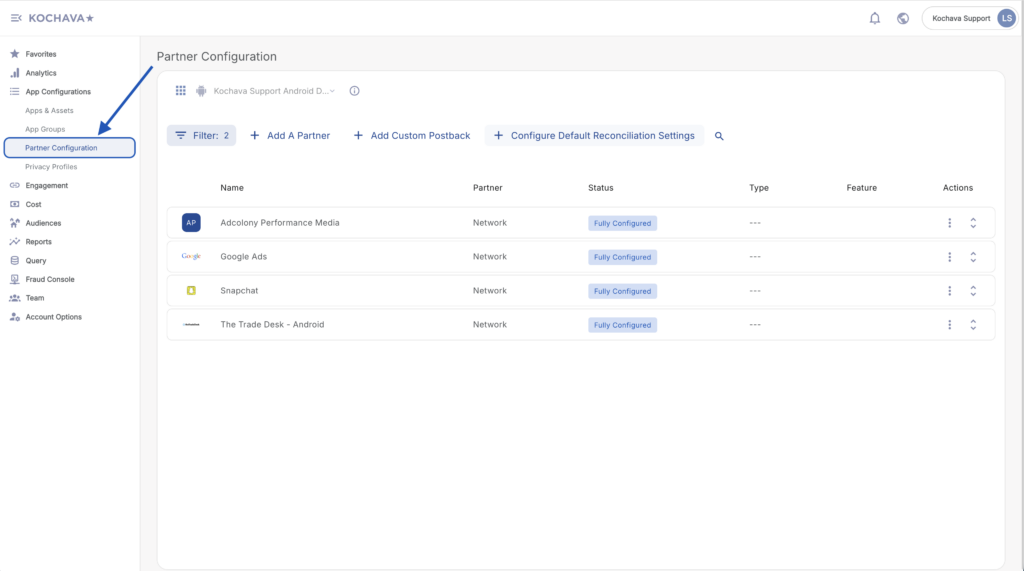
- Locate the desired Network.
- Click Network Tools (⋮) > Reconciliation.

Impression Reconciliation Settings
- Select the desired Device Lookback.
Options:
- Disabled
- 15 minutes
- 30 minutes
- 45 minutes
- 1 hour
- 2 hour
- 3 hour
- 4 hour
- 5 hour
- 6 hour
- 7 hour
- 8 hour
- 9 hour
- 10 hour
- 11 hour
- 12 hour
- 13 hour
- 14 hour
- 15 hour
- 16 hour
- 17 hour
- 18 hour
- 19 hour
- 20 hour
- 21 hour
- 22 hour
- 23 hour
- 24 hour
- Select the desired Modeled Lookback.
Options:
- Disabled
- 15 minutes
- 30 minutes
- 45 minutes
- 1 hour
- 2 hour
- 3 hour
- 4 hour
- 5 hour
- 6 hour
- 7 hour
- 8 hour
- 9 hour
- 10 hour
- 11 hour
- 12 hour
- 13 hour
- 14 hour
- 15 hour
- 16 hour
- 17 hour
- 18 hour
- 19 hour
- 20 hour
- 21 hour
- 22 hour
- 23 hour
- 24 hour
- Select the desired IP Lookback.
Options:
- Disabled
- 15 minutes
- 30 minutes
- 45 minutes
- 1 hour
- 2 hour
- 3 hour
- 4 hour
- 5 hour
- 6 hour
- 7 hour
- 8 hour
- 9 hour
- 10 hour
- 11 hour
- 12 hour
- 13 hour
- 14 hour
- 15 hour
- 16 hour
- 17 hour
- 18 hour
- 19 hour
- 20 hour
- 21 hour
- 22 hour
- 23 hour
- 24 hour

- Select the desired Partial IP Lookback.
Options:
- Disabled
- 15 minutes
- 30 minutes
- 45 minutes
- 1 hour
- 2 hours
- 3 hours
- 4 hours
- 5 hours
- 6 hours
- 7 hours
- 8 hours
- 9 hours
- 10 hours
- 11 hours
- 12 hours
- 13 hours
- 14 hours
- 15 hours
- 16 hours
- 17 hours
- 18 hours
- 19 hours
- 20 hours
- 21 hours
- 22 hours
- 23 hours
- 24 hours
- Select the desired Device Attribution Behavior.
Options:
- Standard
- Inclusive
- Configure CTV Equal Priority.
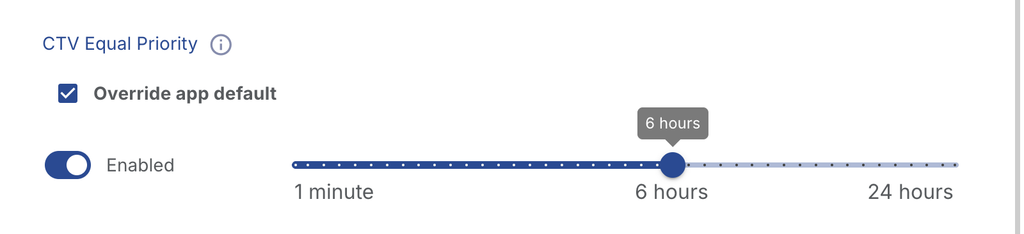
Options:
- Override app default – Select this checkbox to customize CTV Equal Priority for this partner. When it is not selected, the partner inherits the CTV Equal Priority setting from the app’s Default Reconciliation Settings, and the controls below are displayed but cannot be edited.
- Enabled – Turns CTV Equal Priority on or off for this partner.
- On: CTV impressions from this partner that fall within the lookback window compete with clicks on recency. The engagement closest to the time of install wins attribution.
- Off: The standard waterfall applies. A valid click within its lookback window takes priority over a CTV impression, regardless of recency.
- Lookback slider – Sets how long a CTV impression competes with a click on recency.
- Range: 1 minute – 24 hours
- Default: 6 hours
Click Reconciliation Settings
- Select the desired Device Lookback
Options:
- 1 day
- 2 days
- 3 days
- 4 days
- 5 days
- 6 days
- 7 days
- 8 days
- 9 days
- 10 days
- 11 days
- 12 days
- 13 days
- 14 days
- 15 days
- 16 days
- 17 days
- 18 days
- 19 days
- 20 days
- 21 days
- 22 days
- 23 days
- 24 days
- 25 days
- 26 days
- 27 days
- 28 days
- 29 days
- 30 days
- 31 days
- Select the desired Modeled Lookback
Options:
- 1 day
- 2 days
- 3 days
- 4 days
- 5 days
- 6 days
- 7 days
- 8 days
- 9 days
- 10 days
- 11 days
- 12 days
- 13 days
- 14 days
- 15 days
- 16 days
- 17 days
- 18 days
- 19 days
- 20 days
- 21 days
- 22 days
- 23 days
- 24 days
- 25 days
- 26 days
- 27 days
- 28 days
- 29 days
- 30 days
- 31 days
- Select the desired IP and Partial IP Lookback.
Options:
- 1 hour
- 2 hours
- 3 hours
- 4 hours
- 5 hours
- 6 hours
- 7 hours
- 8 hours
- 9 hours
- 10 hours
- 11 hours
- 12 hours
- 13 hours
- 14 hours
- 15 hours
- 16 hours
- 17 hours
- 18 hours
- 19 hours
- 20 hours
- 21 hours
- 22 hours
- 23 hours

- Select the desired Device Attribution Behavior.
Options:
- Standard
- Inclusive
- Select the desired Modeled Attribution Tier.
Options:
- Enforce All 3 Chrome Hints
Allows for probabilistic attribution when either of the following are met:- IP & user agent match
- IP & all three UA hints match
- Sec-CH-UA-Model
- Sec-CH-UA-Platform
- Sec-CH-UA-Platform-Version
- Standard
Allows for probablistic attribution when either of the following are met:- IP & user agent match
- IP & 2/3 UA hints match
- Sec-CH-UA-Model
- Sec-CH-UA-Platform
- Sec-CH-UA-Platform-Version
- Full IP Address
- Partial IP Address
- Click Save.