This feature is available only with paid Kochava accounts. Contact us to learn more.
Creating audience segments is important to perform more specific targeting. Create audience segments to target users such as high-value users or users for reengagement.
External audiences can be joined with audiences that have been created within Kochava. The below Query example searches for device IDs that have accessed the app within a certain date range (7 days) but has not made a purchase.
Audiences can be easily created within Analytics or joined with external data within Query to create specifically granular audience sets. Kochava Audiences provides a single location for the delivery of an audience to a media partner for activation on a marketing campaign, or the export of an audience as a row-level list of device IDs to an email address or S3 bucket.
Audiences User Interface
- Log in to Kochava.
- Select the desired Account.
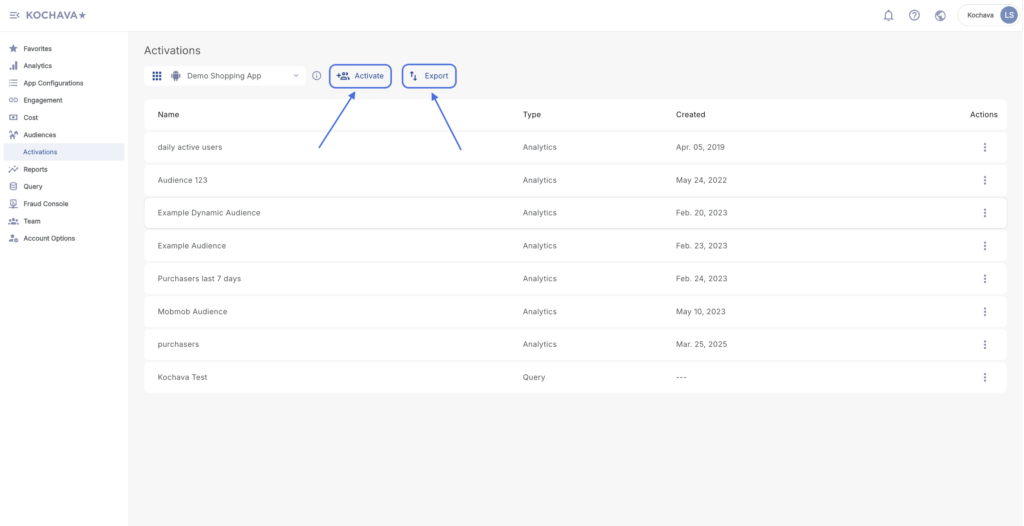
- Select Audiences > Activations.
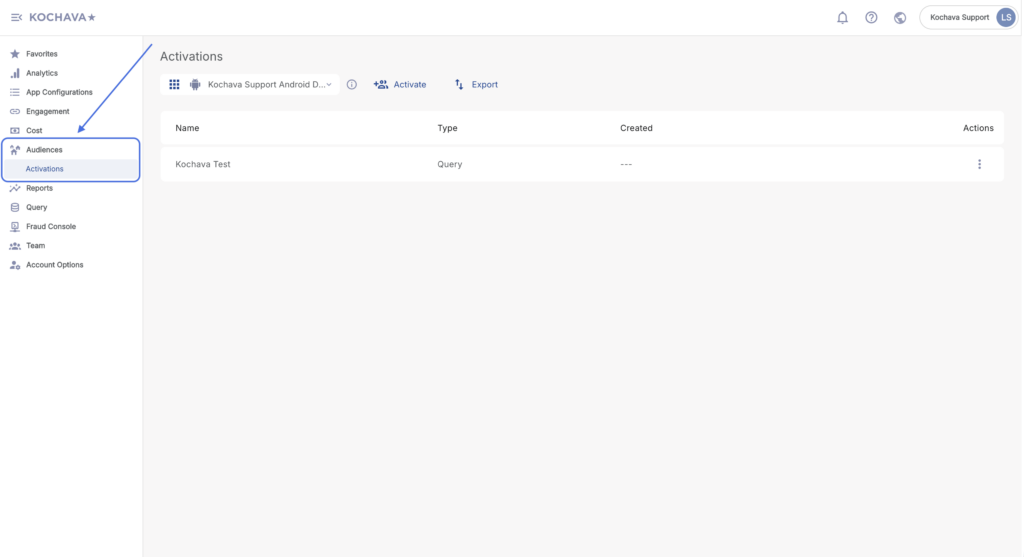
Creating an Audience
Analytics:
From many views within Analytics, audiences can be created and saved. For more information about creating and saving audiences in Analytics, refer to our Analytics Page Tools support documentation.
Acquisition Audience Example —
Locating high-value users is very important. Analytics Funnel provides a unique opportunity to locate a user base that can be used within an Activation Partner to acquire a lookalike audience. For example, a shopping app looking for users that make purchases after completing a specific event such as completing a login. The data shows that for this shopping app if a user completes the login before they make a purchase the lifetime value of those users is much greater. If the Analytics Funnel is used to create an audience of users that have completed the login and then made a purchase, those users can be used to locate a very valuable lookalike audience. Clicking on the devices in the purchase funnel event and selecting Export Audience (Sequence Enforced) will export the device IDs needed.
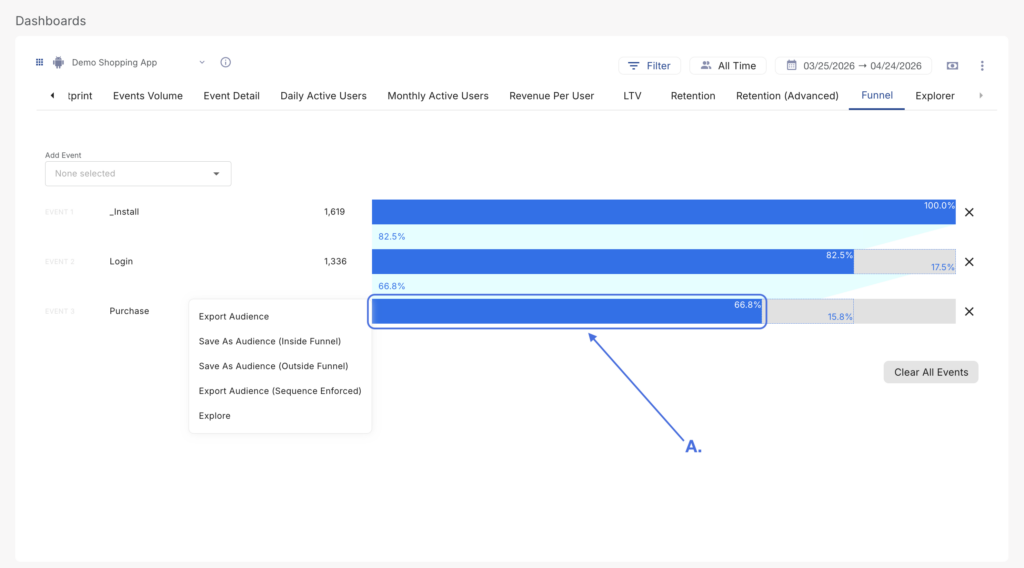
A. High value users to create lookalike audience from.
Reengagement Audience Example —
Depending on the type of app, a reengagement strategy can be specifically designed for the most impact. For example, a shopping app that has a high number of users proceed to login, however they do not complete the purchase and there is a drastic drop-off of engagement by the users. In order to reengage those users, the Analytics Funnel can be used to create an audience of users who have completed the login, but have not completed the purchase. Special offers may be sent to users who have completed the login but have not yet made a purchase
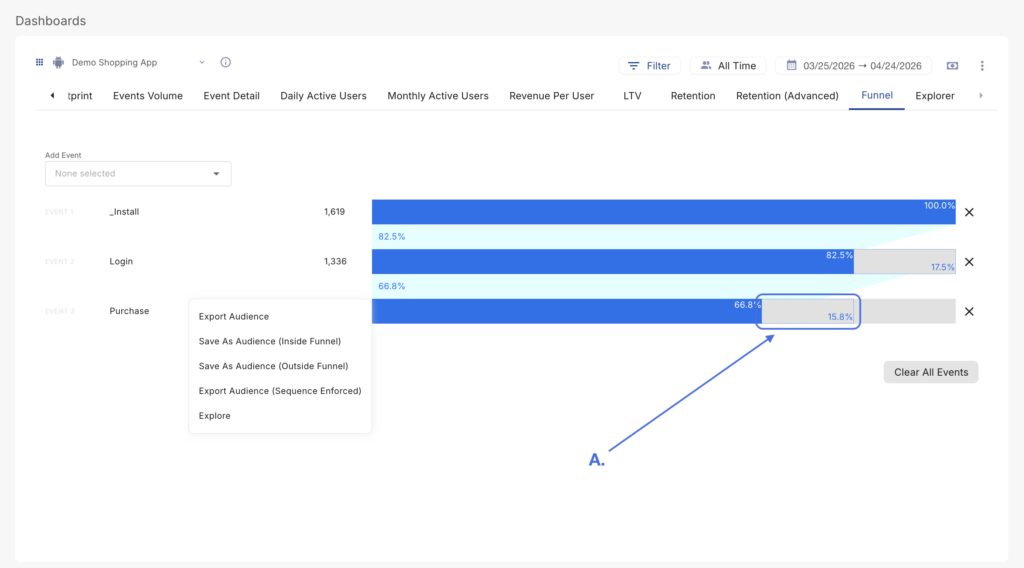
A. Audience to be reengaged.
Managing Audiences
Audiences that have been saved through Query or Analytics can be managed within the Audiences interface.
There are two options available in managing Audiences.
- Activate
- Export
Activate Audiences
Once an audience has been created, the audience may be delivered directly to a media partner for activation on a marketing campaign.
- Click Activate or locate the desired Audience and Click Audience Tools (⋮) > Activate.
- Select the Audience.
- Select the Timezone.
- Select the Frequency:
- One-Time
- Scheduled/Recurring
- Select a Date Range:
- Today
- Yesterday
- Week-to-Date
- Last Week
- Last 7 Days
- Month-to-Date
- Last Month
- Last 30 Days
- Custom Range
- Enter a Recipient(s).
- Select a Media Partner.
- Enter the Media Partner Credentials.
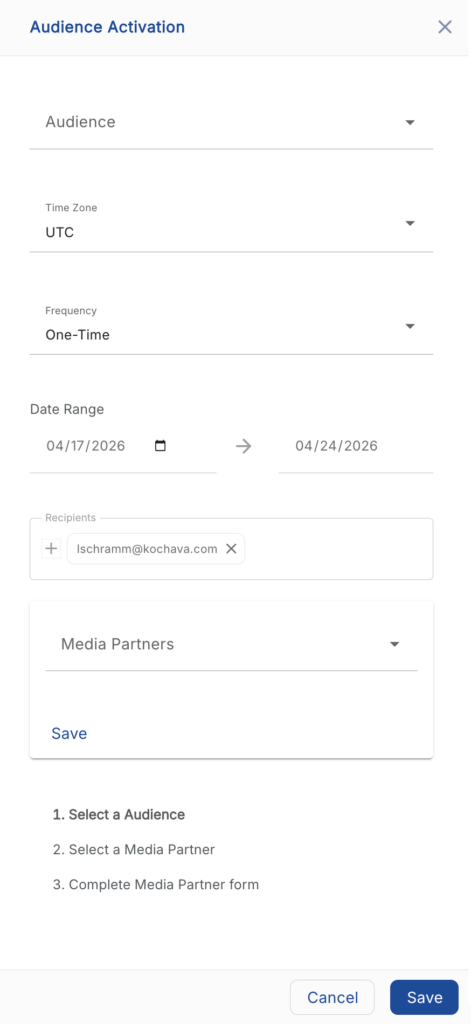
- Click Save.
What happens when an analytic audience is scheduled to be sent to an activation partner?
- Each scheduled audience will be rerun according to the frequency selected in the recurring to generate the refreshed audience for send to partner.
- Daily (3am for selected time zone) UTC run for midnight to midnight previous day.
- Weekly (4am for selected time zone) UTC run for midnight to midnight previous week.
- Monthly (5am for selected time zone) UTC run for midnight to midnight previous month.
- All dates ranges will be converted into a dynamic audience.
For what time period is the audience re-generated?
If an audience is created for 14 days last October, and I want to send it to an Activation partner every Monday, how is this audience re-generated each week? Is it re-generated using that same timeframe in October or is it re-generated using a new more current timeframe?
- Analytics – Save as Analytics Audience:
- Daily (3am for selected time zone) UTC run for midnight to midnight previous day.
- Weekly (4am for selected time zone) UTC run for midnight to midnight previous week.
- Monthly (5am for selected time zone) UTC run for midnight to midnight previous month.
- Audience Query:
- Kochava will rerun the query as saved. User is responsible to date period in where clause.
Export an Audience
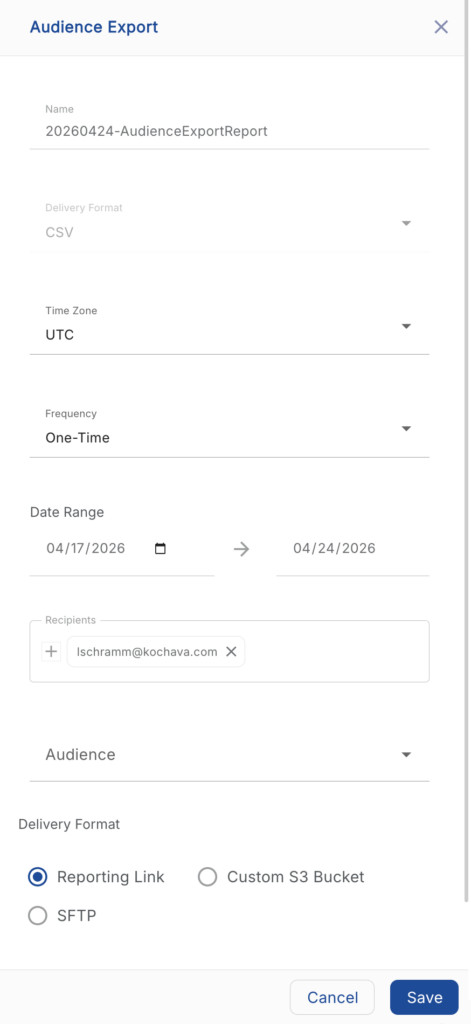
The Export an Audience tool provides the ability to deliver a row-level list of device IDs to an email address or custom S3 bucket.
- Click Export.
- Enter an Export Name.
- Select a Delivery Format:
- CSV
- Select a Timezone.
- Select the export Frequency:
- One-time
- Scheduled/Recurring
- Select a Date Range:
- Enter a Recipient(s).
- Select the Audience.
- Select a Delivery Method:
- Reporting Link
- Custom S3 Bucket:
- Enter the Bucket Name.
- Enter the Bucket Region.
- Enter the AWS Access Key.
- Enter the AWS Secret Key
- SFTP:
- Enter the IP Address.
- Enter the Port.
- Enter the Username.
- Click Save.