
What is attribution and why do you need it? Attribution is the act of assigning credit to the advertising source that most strongly influenced a conversion (e.g. app install). It is important to know where your users are discovering your app when making future marketing decisions.
The Kochava attribution engine is comprehensive, authoritative and actionable. The system considers all possible factors and then separates the winning click from the influencers in real-time. The primary elements of engagement are impressions, clicks, installs and events. Each element has specific criteria which are then weighed to separate winning engagements from influencing engagements.
Engagements
Kochava collects (via momentary redirect or network server ping) device information when an impression is served or a user clicks on an advertisement served by a network. Each of these engagements are eligible for attribution. This collected device information ranges from unique device identifiers to the IP address of the device at the time of click or impression, dependent upon the capabilities of the network.
Kochava has thousands of unique integrations. Through the integration process, we have established which device identifiers and parameters each network is capable of passing on impression and/or click. The more device identifiers that a network can pass, the more data is available to Kochava for reconciling clicks to installs. When no device identifiers are provided, Kochava’s robust modeled logic is employed which relies upon IP address and device user agent. The integrity of a modeled match is lower than a device-based match, yet still results in over 90% accuracy.
The Kochava system also determines whether a device has previously engaged with an advertisement. When multiple engagements of the same type occur, they are identified as duplicates to provide advertisers with more insight into the nature of their traffic.
Kochava tracks every engagement with every ad served, which sets the stage for a comprehensive and authoritative reconciliation process.
Installs
Once the app is installed and launched, Kochava receives an install ping (either from the Kochava SDK within the app, or from the advertiser’s server via Server-to-Server integration). The install ping includes device identifiers as well as IP address and the user agent of the device. The data received on install is then used to find all matching engagements based on the advertiser’s settings within the Postback Configuration and deduplicated. For more information on campaign testing and device deduplication, refer to our Testing a Campaign support document.
Events
The advertiser has complete control over the implementation of tracking events within the app. In the case of reconciliation, the advertiser has the ability to specify which post-install event(s) define the conversion point for a given campaign. The lookback window for event attribution within a reengagement campaign can be refined within the Tracker Override Settings. If no reengagement campaign exists, all events will be attributed to the source of the acquisition, whether attributed or unattributed (organic).
Reconciliation Factors
- Lookback Window
- Match Type
- Match Integrity
Lookback Window:
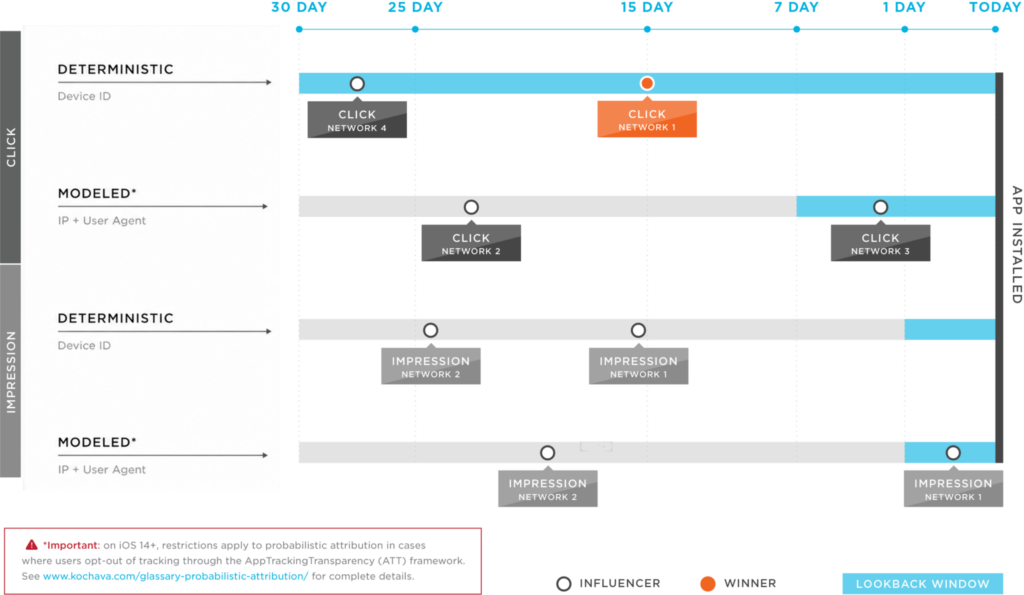
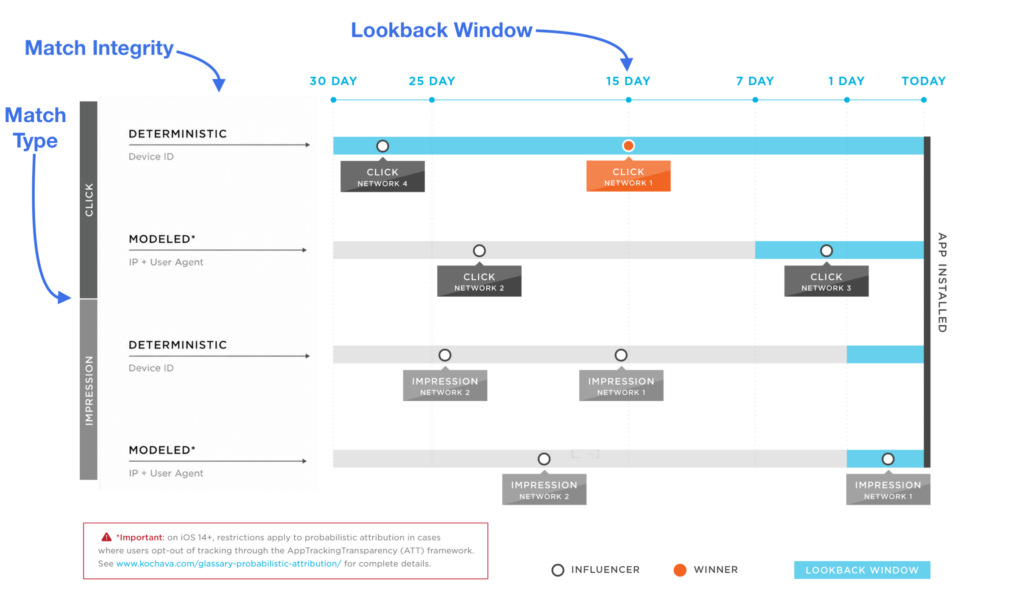
The lookback window defines how far back, from the time of install or event, to consider engagements for attribution. There are different lookback window configurations for Device and Modeled matches for both clicks and impressions.
Match Type:
The “Match Type” referred to the type of ad engagement, clicks or impressions. Clicks have a higher priority in Kochava’s attribution waterfall due to the level of engagement with the ad where clicks demonstrate user intent, whereas impressions are more passive ad interactions. When both a click and impression are eligible for attribution to an install or post-install event, a click will win against an impression, even if it is further back in the lookback window.
Match Integrity:
The final criteria for reconciliation is the “Match Integrity”. Match Integrity refers to either Deterministic or Modeled forms of attribution.
- Deterministic – This is a definitive 1 to 1 match from click or impression to install or post-install event using advertising IDs such as ADID or IDFA. Deterministic attribution has a higher priority in the waterfall than Modeled.
- Modeled – In lieu of being able to perform a deterministic match, a Modeled match is the next best thing. Modeled attribution leverages certain pieces of device information to perform a match, which are the device’s IP Address, and User Agent. The combination of IP & UA is not definitive, rather it is probabilistic in nature, however it is highly accurate within a shorter time window. This is why you will see the modeled attribution lookback windows shorter that deterministic by default.
Click Matching —
Clicks have a higher priority for attribution than impressions
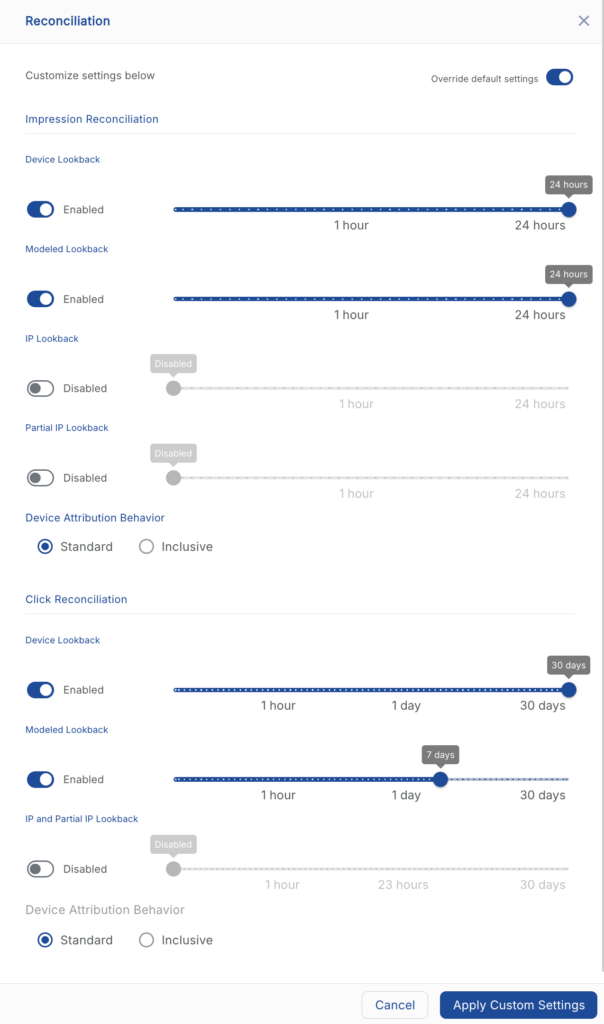
- Device-Based Matches (30 Day lookback by default)
- Self-Attributing Network (SAN) claims including Facebook, Twitter, Apple Search Ads and Google
- Device ID
- Google Referrer
- Modeled: Standard (IP Address + User Agent) (7 Day lookback by default)
- No Device ID present on click
- Unmatched Device ID present
- Modeled: IP Only (Disabled by default)
- No Device ID present on click
- Unmatched Device ID present
- Modeled: Partial IP (Disabled by default)
- No Device ID present on click
- Unmatched Device ID present
Impression Matching —
After click matching has been attempted, all unattributed installs or events are subject to impression matching.
- Device-Based Match (24 hour lookback by default)
- Completed View (this is an impression type, defined by each network, often referring to a completed video view)
- All other impression types (any other tracked impressions)
- Modeled: Standard (IP Address + User Agent) (24 hour lookback by default)
- Completed View (this is an impression type, defined by each network, often referring to a completed video view)
- All other impression types (any other tracked impressions)
- Modeled: IP Only (Disabled by default)
- Completed View (this is an impression type, defined by each network, often referring to a completed video view)
- All other impression types (any other tracked impressions)
- Modeled: Partial IP (Disabled by default)
- Completed View (this is an impression type, defined by each network, often referring to a completed video view)
- All other impression types (any other tracked impressions)