
In order to test the deferred deeplink flow, we must perform install attribution to the device being used for testing. This requires you to “Scrub” the device from our system so no other attribution sources can potentially match to the device. Instructions are included below.
Preparation of the Test Device
Complete one of the following:
- The test device has never had the app installed.
- The app has been uninstalled and the device has been scrubbed. For more information on scrubbing the test device, refer to our Scrubbing a Device ID support documentation.
Testing SmartLink™ Attribution Procedures
Within Kochava UI
- Log in to Kochava.
- Select the desired Account.
- Select Engagement > SmartLinks™.
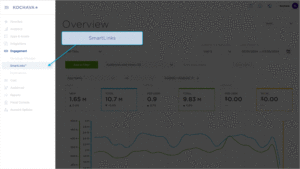
- Locate the desired SmartLink.
- Locate the Click URL.
- Copy and email the Click URL to an email address accessible from the test device.
Within Test Device
- Click the Click URL.
- Install the app.
- Launch the app on the test device.
Troubleshooting
- Testing development builds on Android devices:
- In 2023, Chrome limited User Agent availability on Android browsers. This can cause install attribution issues for smartlinks in a testing environment when the app is sideloaded and traditional Play Store attribution tools are unavailable.
- We recommend hardcoding your ADID as a parameter at the end of your smartlink using the device_id field. This will ensure the link achieves deterministic attribution from the sideloaded app.
- Example:
https://smart.link/zcb34jid?device_id={adid}
- Example:
- Testing on iOS devices using Safari as a default browser:
- In 2021, Apple introduced Private Relay, which obscures a device’s IP address when browsing on Safari. By default, Smartlinks rely on a Modeled attribution match of the IP address and User Agent. If Private Relay is enabled, this can cause attribution issues due to the IP mismatch.
- If Private Relay is enabled in your device settings, and Safari is selected as your default browser, please disable it in Settings → Apple Account → iCloud → Private Relay.